
For additional help, please call Medtronic patient services for patients with active devices at 800-510-6735 or Medtronic Customer Service at 888-638-7627.
Instructions for Interstim Trial
Depending on your condition you will be scheduled for your implantation (stage II) either 1 or 2 weeks after your trial (stage I).
Before Stage I
- Make sure to record at least 2 days of symptoms on your diary prior to stage I.
- Read the patient therapy guide, so you will be more familiar with the equipment during the trial (Medtronic Therapy Guide).
- Make sure you have your appointment (may be telehealth or in person) scheduled for the trial period.
The Trial Period (After Stage I and Before Stage II)
- Make sure to record at least 2 days of symptoms on your diary during the trial period
- Keep your scheduled follow-up appointment (in person or telehealth).
- If you have an in person appointment bring your smart programmer (looks like a cell phone) and communicator (white device). Make sure they are fully charged
- The lead will be covered with a clear dressing. Keep this dressing in place until you come back to the OR. Keep this dry.
- Take frequent, short walks throughout the day to prevent blood clots. Rest when you get tired.
- Do not lift anything that is heavier than 10 lb. (around a gallon of milk).
- Do not do strenuous activities, such as running or aerobics for 6 weeks after surgery.
- You may drive when you feel safe to do so and are no longer using narcotic pain medication (tramadol).
- Do not take baths, swim, or use a hot tub.
- Do not shower after 1st stage surgery, because the lead and the dressing cannot get wet. You may have a sponge bath during the trial period.
- Check your incision areas every day for signs of infection. Check for:
- Redness, swelling, or pain.
- Fluid or blood.
- Warmth.
- Pus or a bad smell.
If you are worried that the dressing may need to be changed, please call the office at 408-827-4274 to arrange a visit.
After Stage II: Incision
You will have two small incisions (one on your upper buttock, one near tailbone) following surgery. The wounds are closed with absorbable sutures and covered with surgical glue. Leave the surgical glue alone. It should flake off over time in about 2 weeks. You do not need to apply any antibiotic ointments or creams or clean the incisions with anything more than soap and water. Check your incision areas every day for signs of infection. Check for:
- Redness, swelling, or pain.
- Fluid or blood.
- Warmth.
- Pus or a bad smell.
If you are worried about the incision, please call the office at 408-827-4274 to arrange a visit.
Activity
- Take frequent, short walks throughout the day to prevent blood clots. Rest when you get tired.
- Do not lift anything that is heavier than 10 lb. (Around a gallon of milk) for 6 weeks after surgery.
- Do not do strenuous activities, such as running or aerobics for 6 weeks after surgery.
- You may drive when you feel safe to do so and are no longer using narcotic pain medication (tramadol).
- Do not take baths, swim, or use a hot tub for 6 weeks.
- You can shower 24 hours later.
- Do not use any products that contain nicotine or tobacco. These products include cigarettes, chewing tobacco, and vaping devices, such as e-cigarettes. These can delay incision healing. If you need help quitting, ask your health care provider.
- Do not drink alcohol until you are no longer using narcotic pain medication (tramadol).
- Keep all follow-up visits.
Contact a Health Care Provider If:
- You have chills or a fever more than 101.5.
- Your pain medicine is not helping you.
- You have any signs of infection, such as:
- More redness, swelling, or pain around your incision.
- Fluid or blood coming from your incision.
- Your incision feeling warm to the touch.
- Pus or a bad smell coming from your incision.
Get Help Right Away If:
- You have a fever for more than 2–3 days.
- You have very bad pain.
- You develop a warm, tender area in your leg.
- You have chest pain or trouble breathing.
Using INTERSTIM: Your Evaluation System
External Neurostimulator (ENS): Your ENS is the device, worn externally with a belt, that generates the stimulation.
Programmer: The handheld programmer is how you can adjust and manage your stimulation.
Charging Cable: The black cord is for charging your programmer. Remember to keep your programmer charged.
Please return all Medtronic issued equipment on the final day of your evaluation, including:
- Your Samsung programmer
- Charging block
- Power cord
- Medtronic case
Your Programmer
Note: The programmer is not set up to make phone calls or access the Internet. It’s designed only to manage your evaluation. The programmer functions below will not alter your therapy.

Press and hold the Power button to turn your programmer on. Once the blue Medtronic screen appears, swipe the screen in any direction to unlock the device.
Keep your programmer charged by plugging it in using the cord that came in your box. The battery indicator at the top of the programmer screen will show you how much battery is left.
APPS
Clinician: You should not use this app; it is intended only for clinicians.
My Therapy: This app allows you to manage your stimulation.

Turn Stimulation On or Off
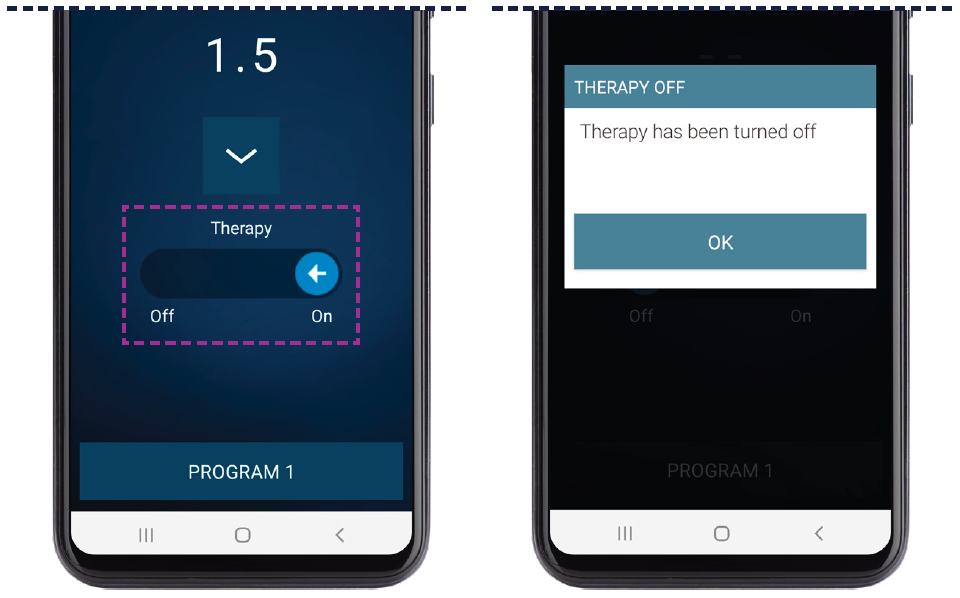
To turn stimulation on, use your finger to swipe the On/Off indicator to the right. To turn stimulation off, use your finger to swipe the On/Off indicator to the left.
Tap OK to acknowledge that you have turned your therapy off.
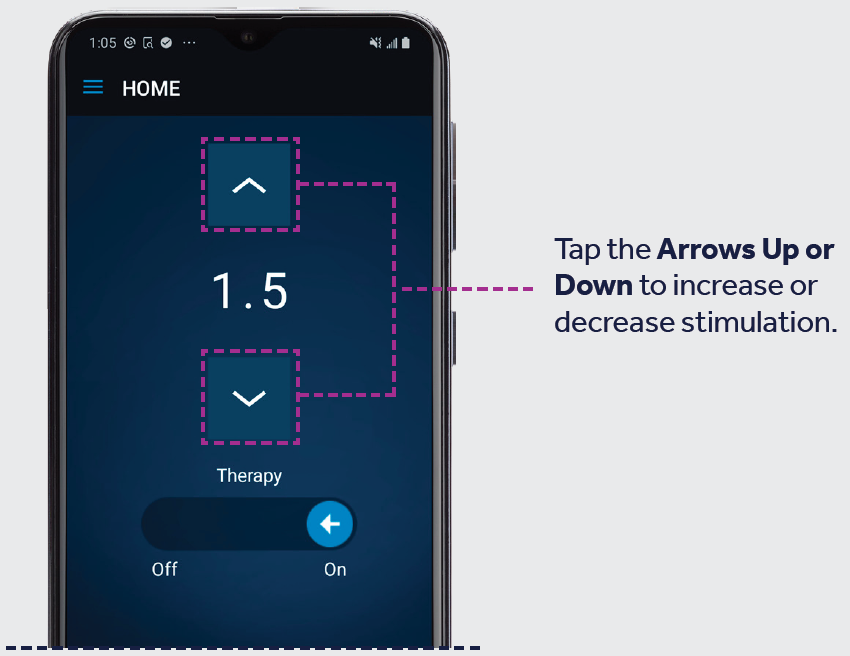
Adjust Your Simulation
Note: Use quick, light taps to make sure you only hit buttons one time. Do not hold the button down.
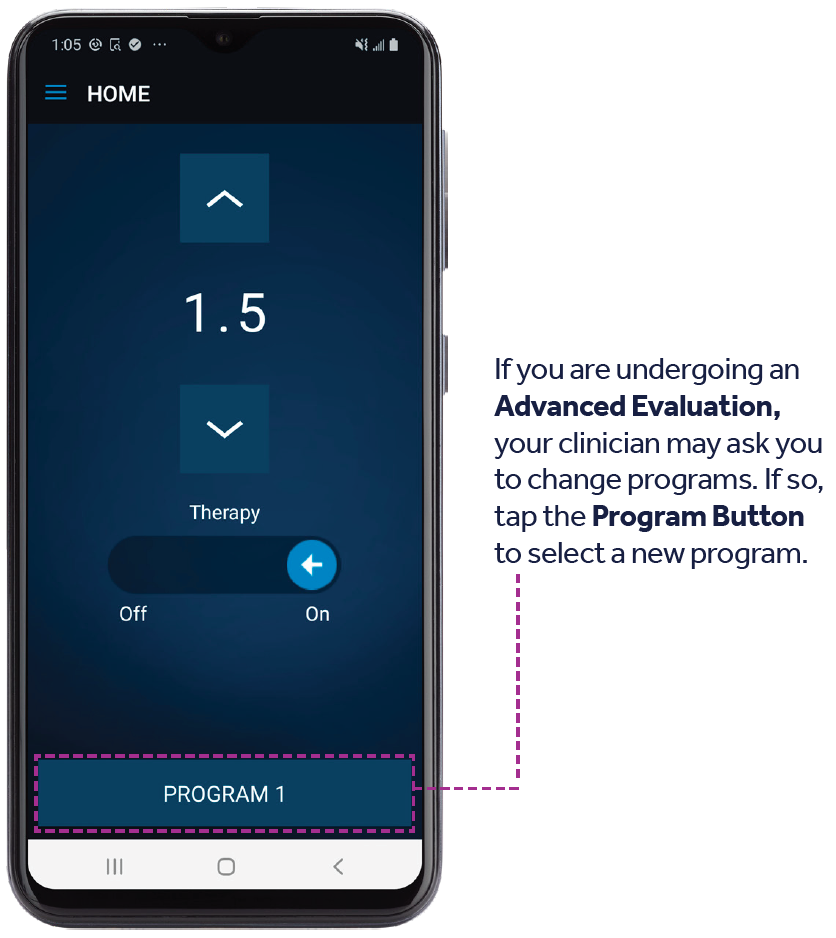
Change Programs
Only available for individuals undergoing an Advanced Evaluation.
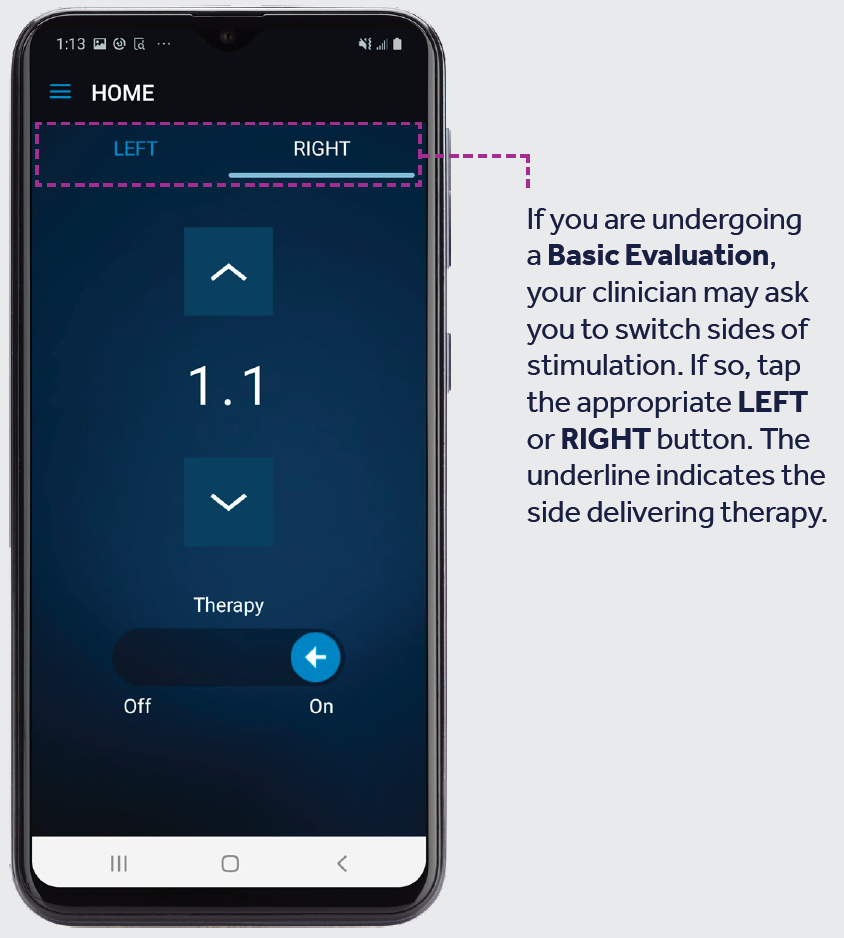
Switch Sides
Only available for individuals undergoing a Basic Evaluation.
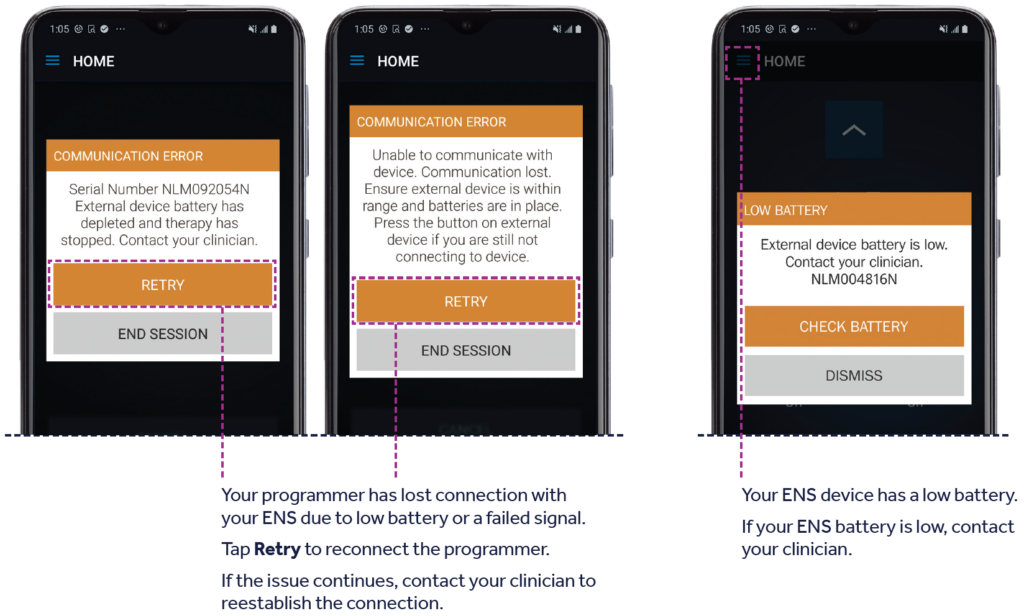
APP Notifications
You may receive alerts from your My Therapy App. If you have questions about an alert not listed here, contact your physician.
Important Reminders
Tracking Your Symptoms
- Be sure to complete the diary as directed by your doctor, and bring it to your next appointment.
Feeling The Stimulation
- If you don’t feel the stimulation but you’re getting symptom relief, there’s no need to adjust your stimulation.
- Changes in body position may affect intensity or location of the stimulation, requiring you to adjust your stimulation. Discuss this with your doctor.
Managing Your Activity Level
- Keep your activity level low to moderate; avoid bending, stretching, twisting, sexual activity, or lifting heavy objects.
- Follow your doctor’s instructions regarding returning to work.
- Avoid baths and showers. Take sponge baths, but be careful to keep the area around the lead (thin wire) and external neurostimulator (ENS) dry.
Using Your Programmer
- If your programmer or the My Therapy App is unresponsive, make sure your programmer is charged. If it’s charged and still unresponsive, turn the programmer off and back on again.
- Your ENS will have new batteries when you go home. The batteries should last for the entire therapy evaluation period. If you receive a low battery alert, contact your doctor.
- Turn stimulation off while driving or using power tools.
- You can use your programmer during air travel, but you’ll need to put it in Airplane Mode. Your programmer will still function and you can adjust your therapy in Airplane Mode.
- If you lose your programmer, contact your clinician or Medtronic Patient Services right away. Your programmer can only be used for evaluations and can be disabled remotely if lost or stolen.
- Remember to return the programmer to your doctor’s office when your evaluation is complete.
Undergoing Other Medical Treatments
- If you see other doctors during the evaluation, inform them that you are using an external neurostimulator evaluating sacral neuromodulation.
- Contact your doctor before any other medical treatments during your evaluation period. Do not have diathermy or an MRI examination during your evaluation.
- Talk with your doctor about any questions you may have regarding your specific situation.
- Call your doctor if you notice any redness or swelling at the site.
Track Your Symptoms
It’s vital that you track your symptoms to see how the evaluation is working. Keep up to date with your diary so you and your doctor can work together to help find relief.
The goal of your evaluation is a 50% or greater improvement in symptoms.
Find a symptom diary you can print and use below.
Bowel Symptom Diary
Track your symptoms in the diary below according to your doctor’s recommendations. If you had no episodes on a given day, record that as well. Please record your urgency rating even if you did not experience leakage. Talk with your doctor if you have questions about completing this diary.

Bladder Symptom Diary
Track your symptoms in the diary below according to your doctor’s recommendations. If you had no episodes on a given day, record that as well. Please record your urgency rating even if you did not experience leakage. Only those receiving therapy indicated for retention need to complete the retention columns. Talk with your doctor if you have questions about completing this diary.

Information derived from a Medtronic pdf.